Write the information you want to share on a small personal card. Every personal field is optional and editable.
Free · No sign-up
Photos stay on your device
Print · PDF · PNG
Print at 100% / Actual size; measure a draft. Match Letter or A4 and turn off browser headers and footers. Photos stay on your device. Shared links include all text and exclude photos.
More options
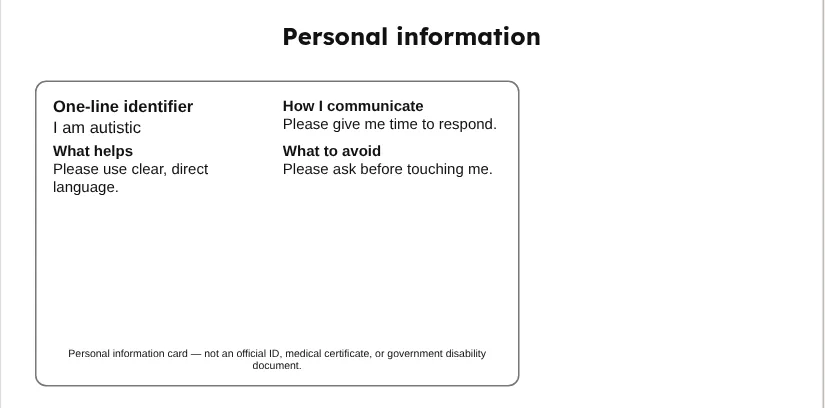
Personal information
One-line identifier I am autistic
How I communicate Please give me time to respond.
What helps Please use clear, direct language.
What to avoid Please ask before touching me.
Personal information card — not an official ID, medical certificate, or government disability document.
Symbols: Mulberry Symbols by Steve Lee, licensed CC BY-SA 4.0 — mulberrysymbols.org · Print at 100% / Actual size
Personal information card — not an official ID, medical certificate, or government disability document.
This is a personal information card you can edit and print. It is not an official identity document, disability certificate, or medical record. It is not a medical certificate or government disability document, and it does not replace official documentation or emergency medical advice. It makes no promises about how another person will respond. The permanent notice on each printed card helps distinguish your homemade stationery from an issued credential.
The starting identifier says “I am autistic”. You can rewrite it or delete it entirely. Use the words you prefer, without having to supply a diagnosis, identification number, or medical history. The name and emergency contact start blank. A card can be useful as a short written introduction, but carrying or showing it is always a personal choice. Decide what you want to say before deciding how much information to include.
Edit or remove every personal field
Write a short explanation of how you communicate, what helps, and what you would prefer others to avoid. The example sentences are editable suggestions. Replace them with your own wording, or clear the field to remove that section from the card. You might describe wanting extra time to respond, a quieter place, written information, or a question asked one at a time. Keep requests specific to your preferences instead of trying to describe every possible situation.
An optional photo is processed locally in your browser. Choose one only if you want it printed. You can remove it without changing the rest of the card. The card has no agency logo, flag, seal, or official emblem. Do not add language suggesting that it grants rights, priority, access, or proof of disability. If a venue or service requires particular documents, check its requirements separately rather than presenting this card as a substitute.
Choose a practical size and check the draft
The credit card option measures 85.6 by 53.98 millimeters in print CSS. A slightly larger badge measures 90 by 60 millimeters. Half letter provides more room for larger text when a pocket card would be too small. Pick single-sided for one card face, or front and back to produce two separate sheets. The separate faces can be cut and placed back to back in a sleeve; automatic duplex alignment is not assumed.
Keep pocket-card wording brief. The editor limits each personal field to one hundred characters, but the available space still depends on your wording. Examine the preview for any clipped or crowded lines. If all your text does not fit, shorten it, choose front and back, or use half letter. The notice at the bottom is permanent and cannot be removed from the sheet. Avoid covering it with a photo or long text when preparing your copy.
Select Letter or A4, then print at actual size or one hundred percent. Disable the browser’s own headers and footers and measure a draft with a ruler. Fit-to-page scaling can change the size. Optional cut lines mark the card edge. Test a sleeve or badge holder before laminating several copies, and leave enough laminate around the edge for a sealed border. A holder can make it easier to replace a card when your preferences or contact information change.
Think carefully before saving or sharing
Name and contact fields have a warning because a share link includes those values, along with every other text field. Anyone receiving that link can read them. Leave them blank before sharing an example, and inspect the generated link’s contents if you are unsure. Photo bytes are excluded from links. Printed cards, PDFs, and PNGs contain the visible personal information and photos, so decide where to keep those copies and who should receive them.
Text and layout settings are retained in this browser’s localStorage. Photos are kept for the current session unless you opt into Save photos in this browser, which uses local IndexedDB. Delete my photos removes this tool’s saved photos, and Reset board restores the neutral examples. Clear site data on a shared device when appropriate. Recheck contact details before printing a replacement, and review the card whenever your wording or preferences change.
Write only the personal information you want to share.
Choose a card size and check that your wording fits.
Print at actual size and measure a draft before using a sleeve.
Examples of places to use a printed copy
At home, you might keep a copy with belongings you choose to carry. In a classroom, you could use it to introduce your communication preferences. During a hospital stay, you may decide to show it to staff alongside the information they request. Someone with speech difficulties might prefer to present a short written introduction. Showing the card is optional; it is not an official ID and does not replace medical advice.
No. It is a personal information card, not an official ID, medical certificate, government disability document, or proof of eligibility.
Does this replace professional or emergency advice?
No. It does not replace official documentation, assessment, professional support, or emergency medical advice.
Can I remove the name or identifier?
Yes. Clear any personal field to omit it. The one-line identifier, name, contact, other text, and photo are optional. The unofficial-card notice remains.
What is included in a share link?
All text fields, including a filled name or contact, are included. Photo bytes are excluded. Leave identifying fields blank before sharing a template.
How big is the printed card?
Credit card is 85.6 × 53.98 mm, badge is 90 × 60 mm, and half letter is 139.7 × 215.9 mm. Print at actual size and measure a draft.
How do I print front and back?
Choose Front and back for separate face sheets. Cut and place them back to back in a holder after checking the draft. The tool does not assume automatic duplex alignment.
 Kettle Tools